There are many different ways we can get in contact with a Patient. The time that it is most important is when they have booked an appointment and we need to verify or collect information from them. Trust me, they do not really want to talk to us so it is important we are actively trying to give them a good experience within our interaction. Take a look below at some details on how to do this.
📚Resources Needed
🚀 Tips & Tricks
- The key to proper communication is organization. You should be making notes about the different interactions you may have had and what is happening with the Patient.
- Keep in mind that in most cases, you’re the first person the Patient speaks to and will therefore think the company is that way. If you made the Patient feel nice and special, they will believe the company exists to make them feel nice and special.
- Always, always, always, smile! Bring energy to the call!
- The moment you add a Patient to the EHR they automatically get a text and email saying to download the app.
- Patients can do everything in the besa Health app. Pay copay, see their doctor via video, book appointment, chat with care team, and all things after the appointment can be found there such as medication info.
- The sooner you check the appointment details and contact them, the better chance you have of getting ahold of them.
|
📘 Instructions / Scenarios
This article is not necessarily broken down in steps. Moreso broken down by the situation of the Patient onboarding.
No Active Insurance Coverage
There are times the Patient books an appointment with an old insurance card, or does not know that they no longer have insurance coverage. In this case, we need to contact the Patient.
- Send them a text using Google Voice. Send them the following template:
Hi {Patient Name} 👋 We have received an appointment request for {Date & Time}. We have checked your insurance coverage and saw that you no longer have active coverage. Do you have a new insurance card / plan by chance? If not, you can keep your appointment and see the provider, but it would be an out of pocket visit. Let me know how you would like us to proceed.
Change Appointment Time
There may be times that a Patient books an appointment that is already filled. When this happens you will need to search what time may be the closest to the time they are wanting, or it can be the same time on the next day.
- Send them a text using Google Voice. Send them the following template:
Hi {Patient Name} 👋 We have recieved an appointment request for {Date & Time}. Unfortunetly this slot had just been filled prior to processing your appointment. Looking at the next available time, does {Proposed Date & Time} work with your schedule? You can also download the Besa Health app to upload it, finish onboarding, and meet your doctor — your care team’s excited to see you!
Change Appointment Time
There may be times that a Patient books an appointment that is already filled. When this happens you will need to search what time may be the closest to the time they are wanting, or it can be the same time on the next day.
- Send them a text using Google Voice. Send them the following template:
Hi {Patient Name} 👋 We have recieved an appointment request for {Date & Time}. Unfortunetly this slot had just been filled prior to processing your appointment. Looking at the next available time, does {Proposed Date & Time} work with your schedule? You can also download the Besa Health app to upload it, finish onboarding, and meet your doctor — your care team’s excited to see you!
Patient is missing Insurance information
There are several instances where the Patient will book an appointment and not have all information inputted. In most cases we are held up if the insurance is not listed. Look below at an example. 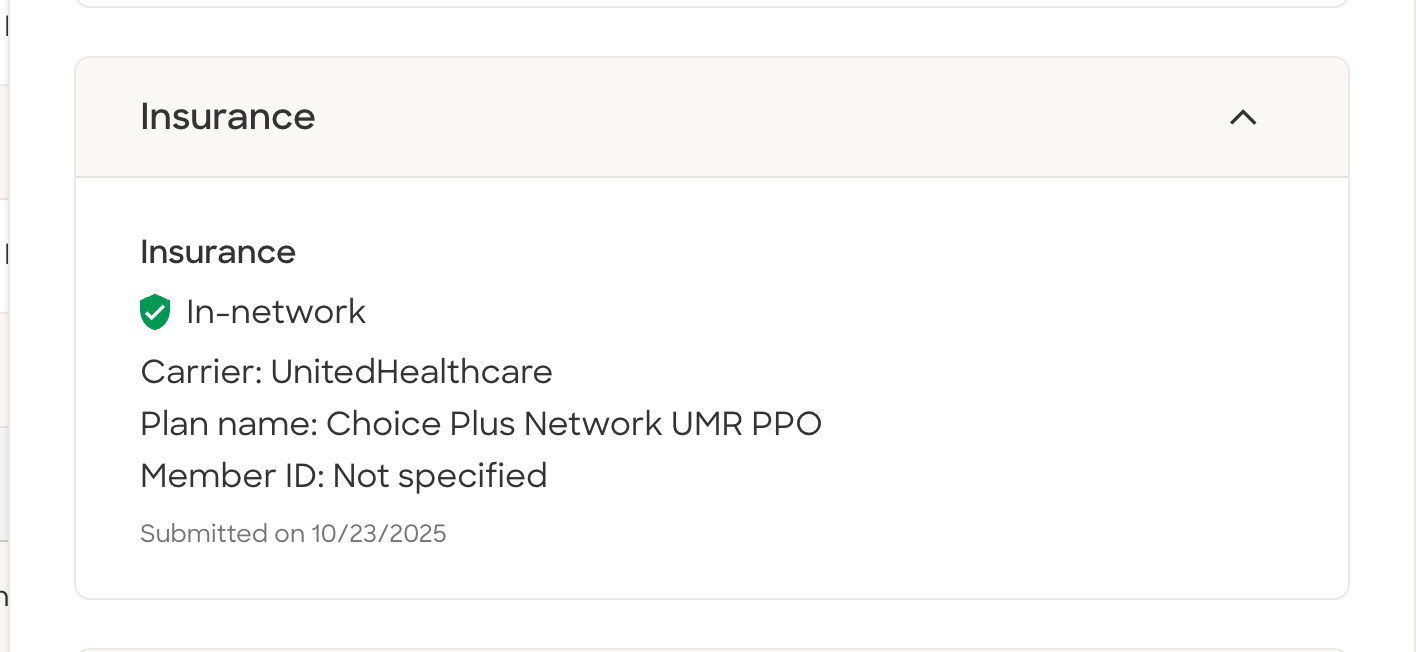
-
Call them using the Google Voice and let them know they need to upload their insurance info, or get it form them right there with the insurance carrier VOB tab open. At the same time you can tell them they should have received a message to download the app. They already have an account so when they download they just need to enter in their email address or phone number to complete the intake form.
- If they don’t answer, send them a text using Google Voice. Send them the following template:
Hi {Patient Name} 👋 We’re almost ready for your doctors appointment, but we’re missing your insurance card. Can you please send us a copy of that? You can also download the Besa Health app to upload it, finish onboarding, and meet your doctor — your care team’s excited to see you!
Patient is missing CA Address
We need a CA address for all Patients. Normally if they do not upload it, or you don't see it on their ID, it will be in their VOB check with their insurance. If is is not there either, you will need to reach out to the Patient to get it.
- Send them a text using Google Voice. Send them the following template:
Hi {Patient Name} 👋 We’re almost ready for your doctors appointment, but we’re missing a California address. Can you please send us a good address for you? You can also download the Besa Health app to upload it, finish onboarding, and meet your doctor — your care team’s excited to see you!
Patient requested an appointment for something we can’t do virtually
It is hard to give specifics for this as you will use your best judgement. It is not too common, but when it happens we should make sure to contact them right away. 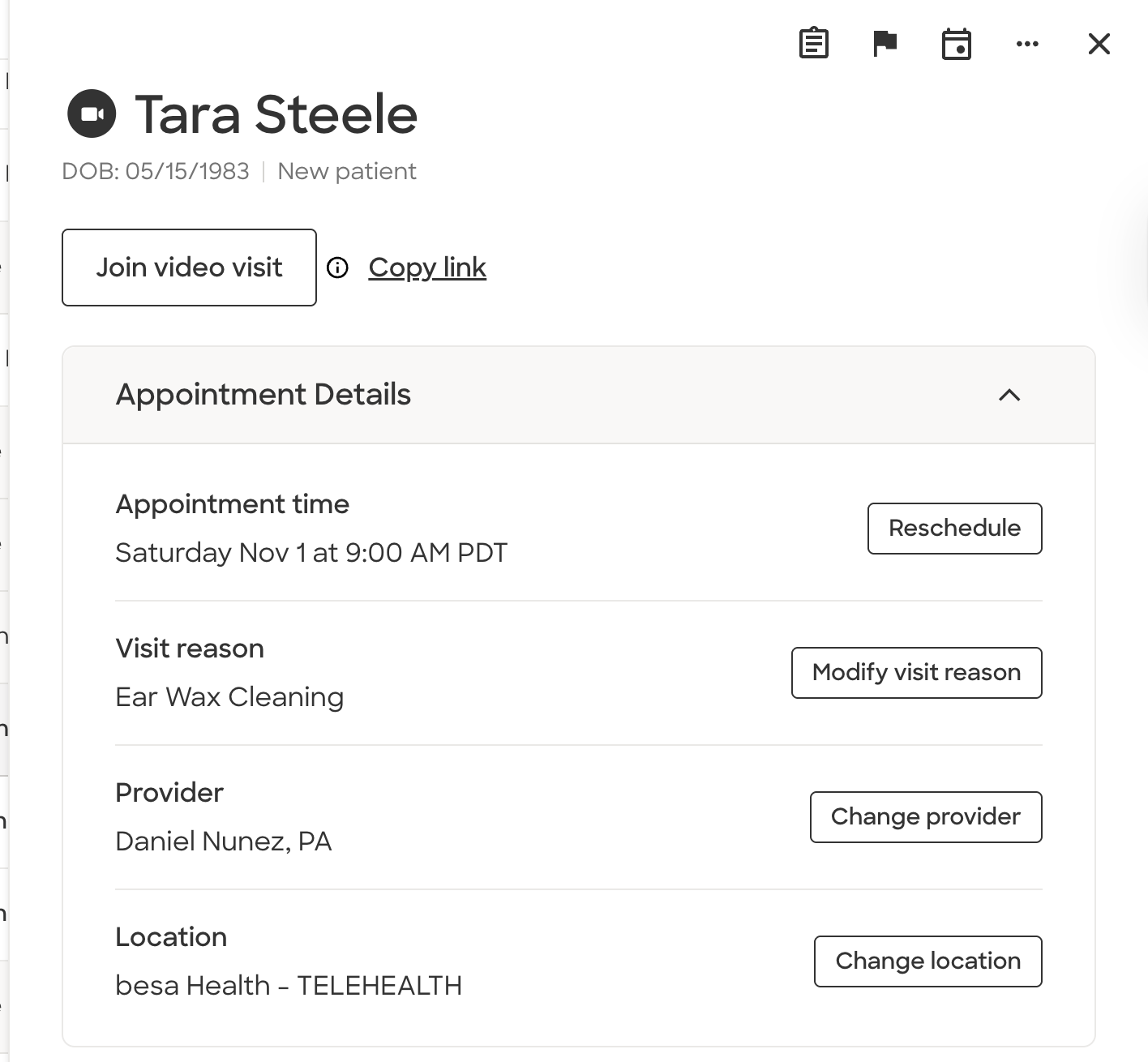
-
Call them using the Google Voice and confirm their appointment reason and let them know it was a virtual visit. If they still want to continue they can, or change the appointment reason. At the same time you can tell them they should have received a message to download the app. They already have an account so when they download they just need to enter in their email address or phone number to complete the intake form.
- If they don’t answer, send them a text using Google Voice. Send them the following template:
🆘Confirmation needed. We are processing your doctor's appointment and noticed the reason for the appointment {Appointment reason} is not common for a telehealth visit. Can you please confirm this is your appointment reason and would like to continue with the appointment, or change your appointment reason.
Patient has not gotten setup in the besa Health app / No confirmation
We want to contact the Patient 1 hour before their visit if they have not downloaded and completed tasks in the besa Health app. We’ll be contacting them to confirm they are still good for their appointment and to tell them to download the app. You will know this by the orange color icon next to their name. 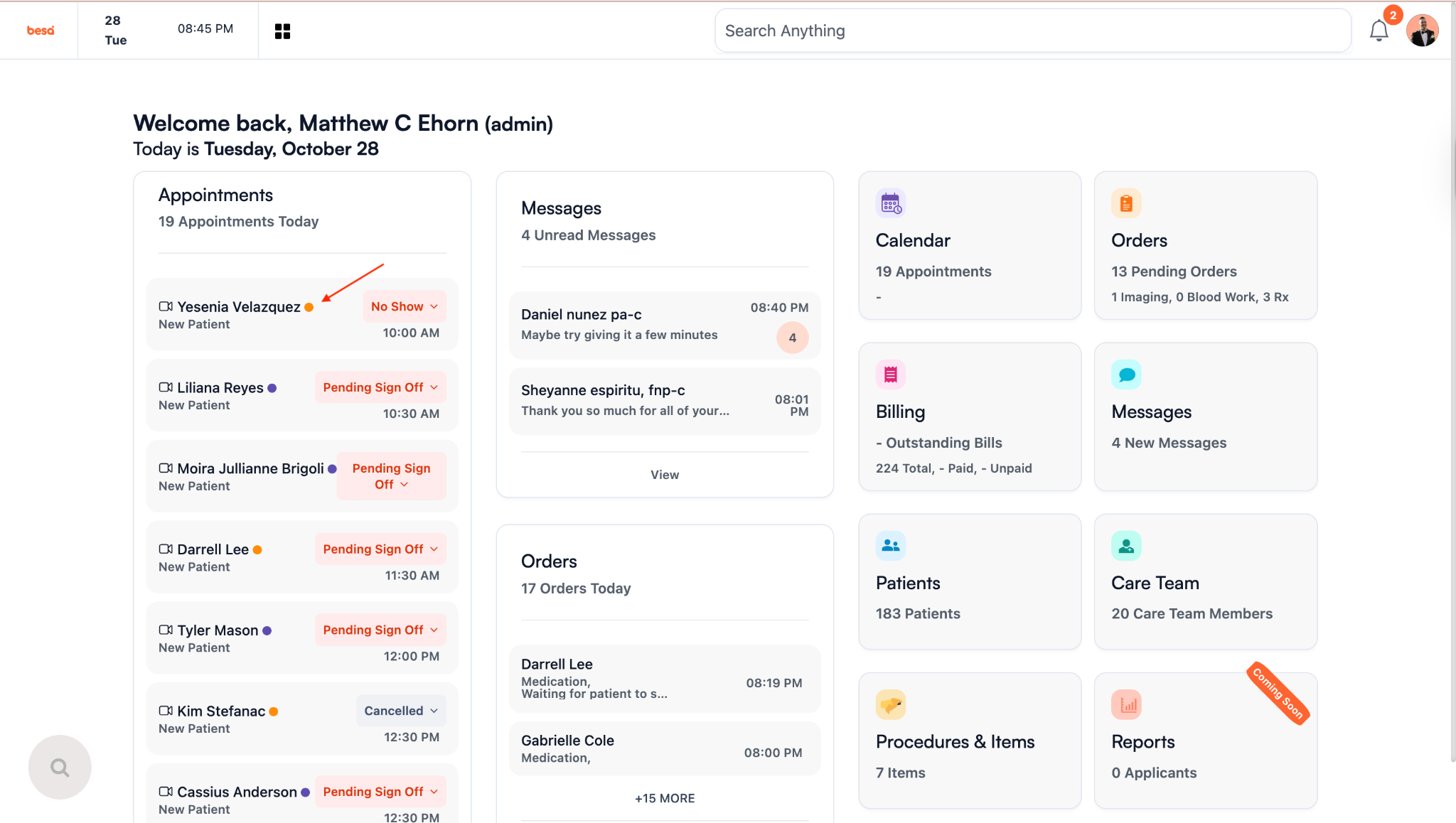
-
Call them using the Google Voice and confirm they are still good for their appointment (Mention appointment time). At the same time you can tell them they should have received a message to download the app. They already have an account so when they download they just need to enter in their email address or phone number to complete the intake form, and that is where all things regarding their visit take place. Also, let them know you will be sending them a text with more info.
- No matter what, send them a text using Google Voice. Send them the following template:
Hello {Patient First Name}, 👋 It looks like we still need you to get setup in the besa Health app to see your doctor. Chat with your care team, schedule appointments and more with the besa Health app.
Just type in your email or phone number in login screen to access your account and appointment. Don’t forget to complete your intake task. ✅
iOS: https://apps.apple.com/us/app/besa-health/id6499292529
Android: https://play.google.com/store/apps/details?id=com.besa.health&hl=en
Patient has copay
You can do this at the same time you called the Patient. There is no text or call, just triggers and automation. You do not need to do this for Patients that already have a card on file. You will know that by when you click Collect Copay, you will see a card listed in the payment method area.
- Go to the billing page and and find the Patient that has an appointment coming up.
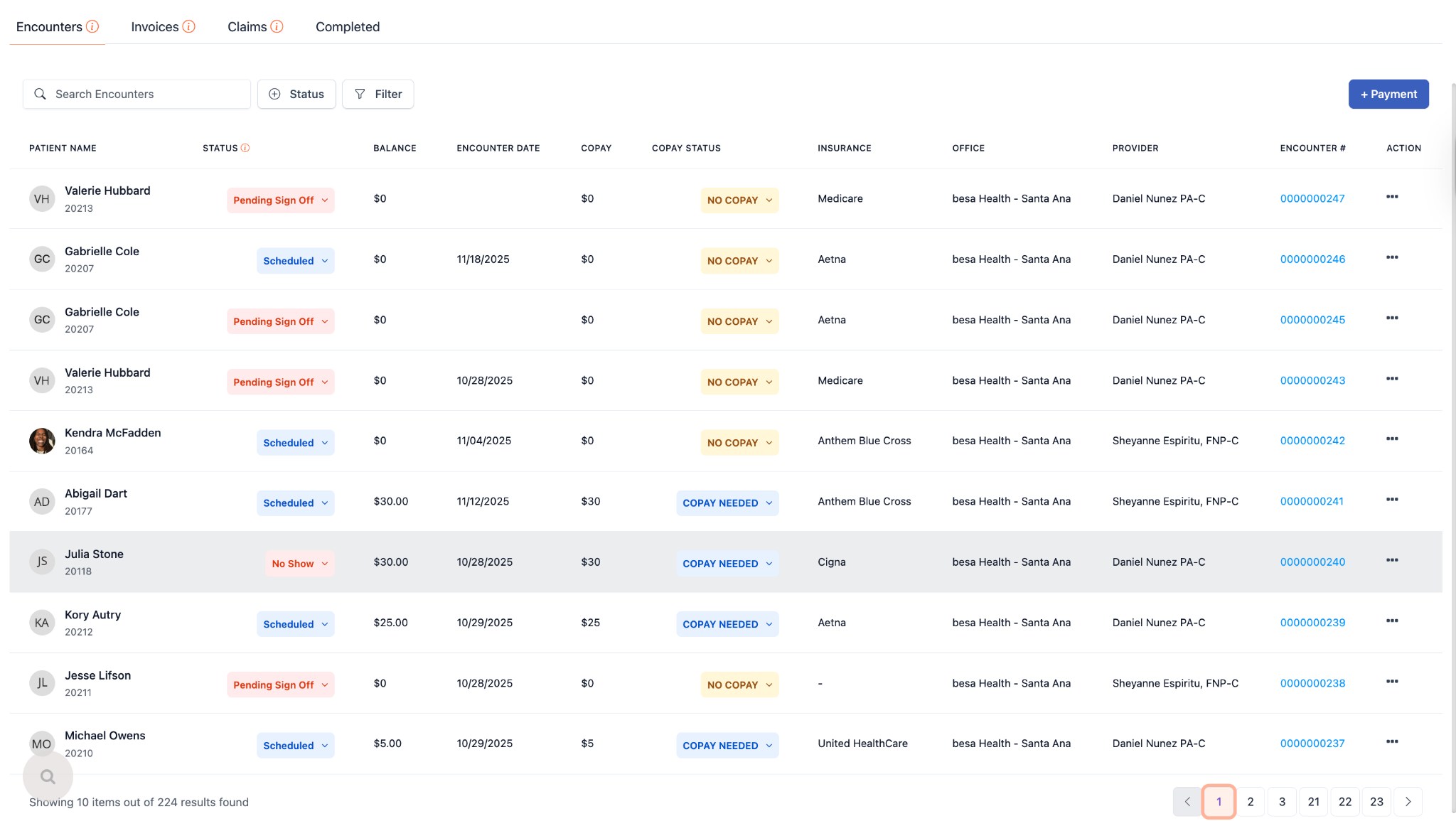
- Click on the action icon and select Collect Copay.
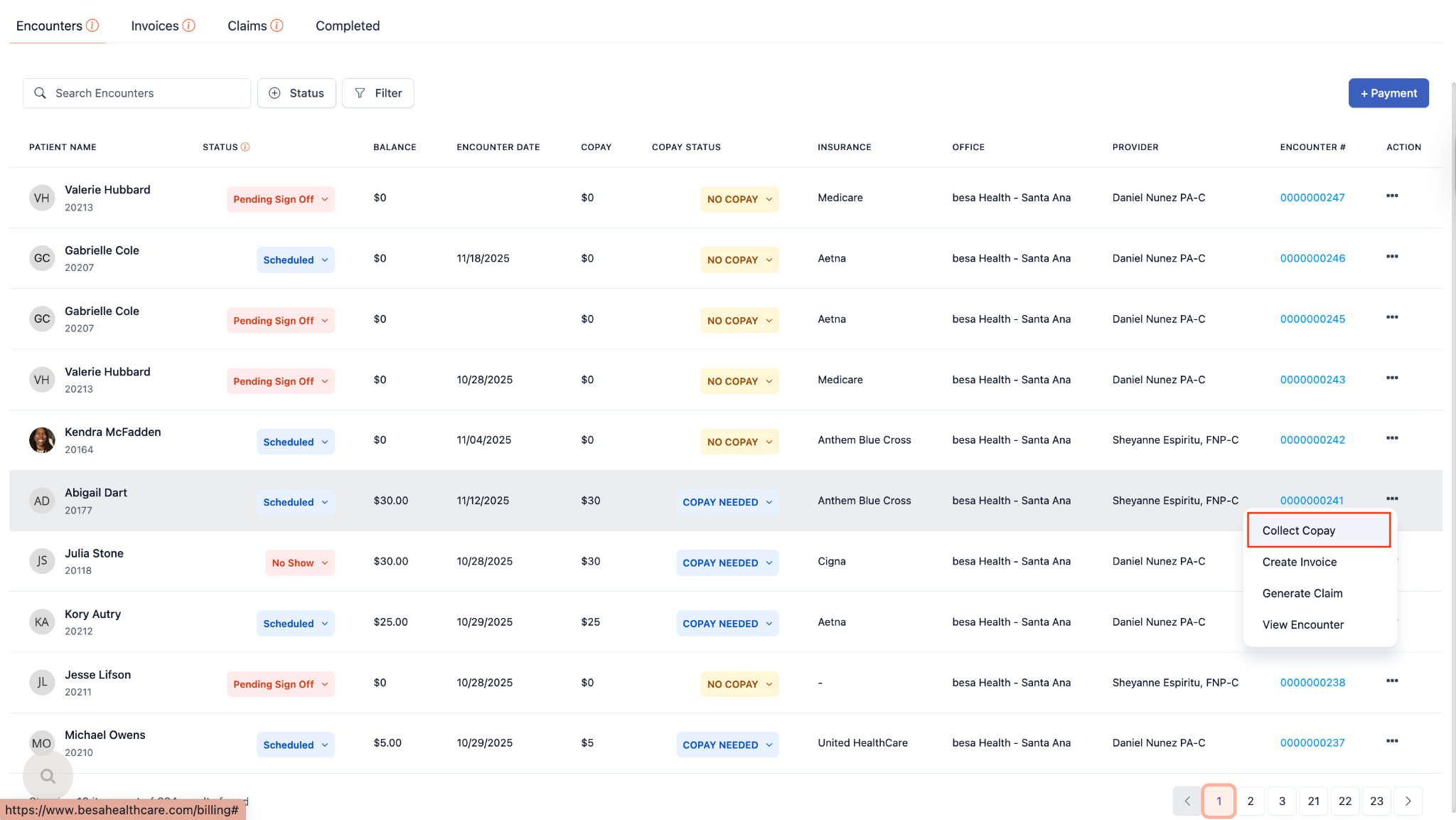
- At the bottom you’ll see a CTA button that says Generate Invoice. Click that. Your page will refresh once you do this.
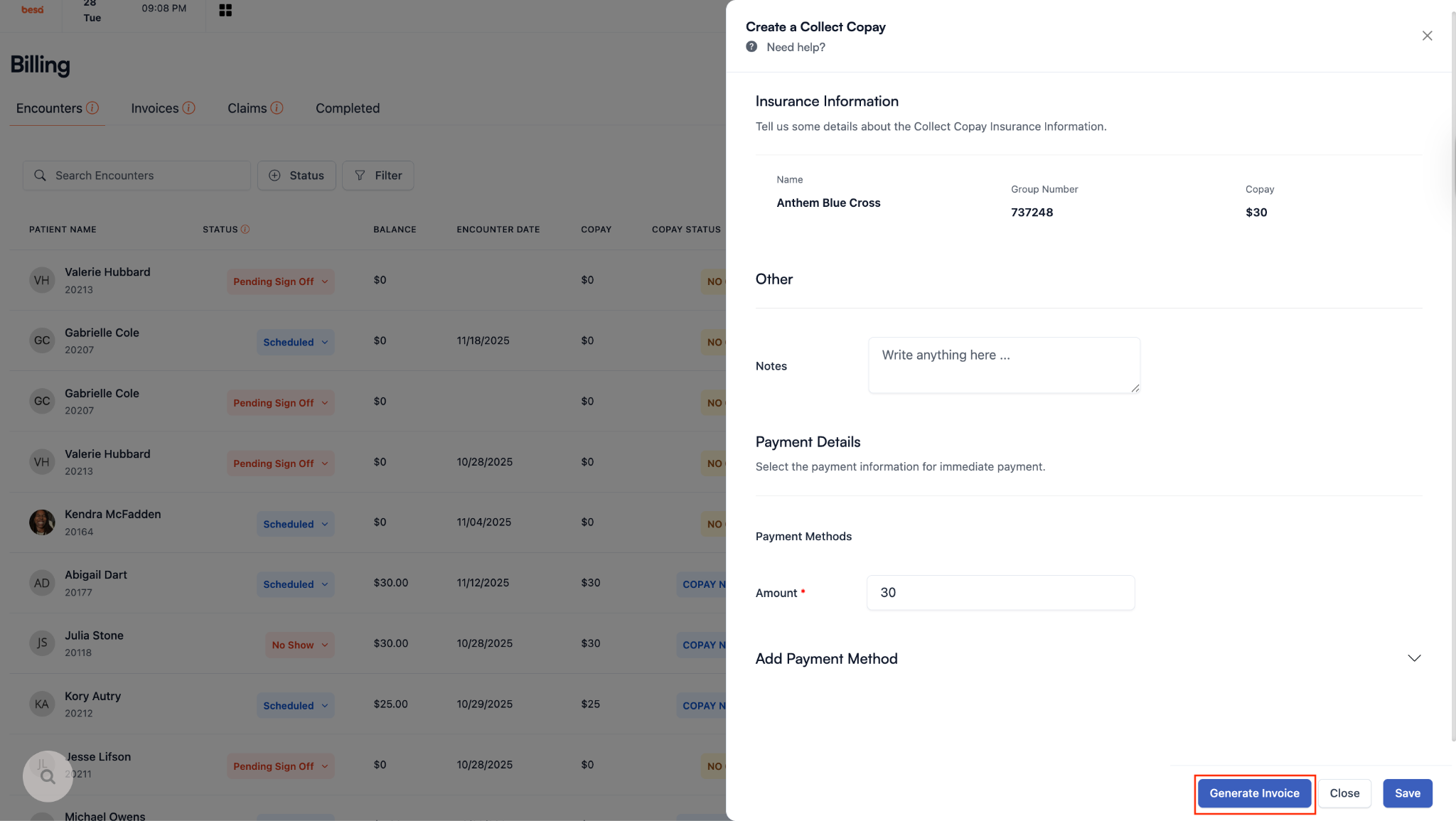
- Now you will see an Actions button. Click on that and select:
- Text
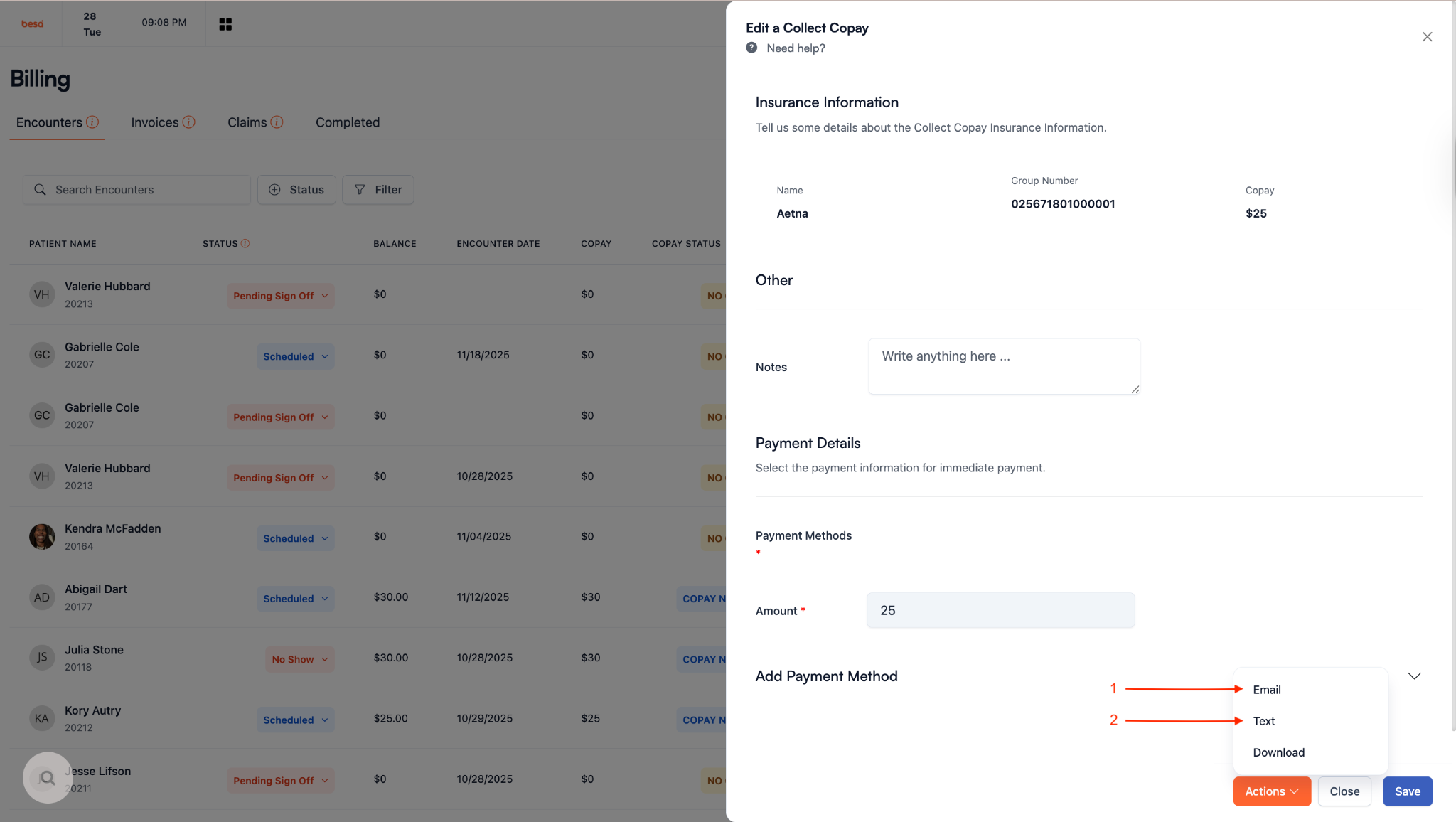
This will automatically send a payment link to the Patient.
Patient cancels appointment
There’s a lot of reasons why a Patient cancels an appointment, but ironically enough, most of the time it is because they are unsure about something. When a Patient cancels, do the following.
- Send them a text using Google Voice. Send them the following template:
Hi {Patient Name}, It's {Your Name} here with besa Health. I just saw the cancellation come through and was going to get that processed. Before I do that, I wanted to see if you would like to reschedule your visit? If so, I can assist with that.
No matter if we are missing forms and info, you’ll at least want to add the Patient and appointment to the system. The only case they are missing something and you need to contact them prior is if they set an appointment for something that cannot be done virtually. I.e. Earwax Cleaning. In that case we will only add them as a Patient.
Don’t forget to make proper notes in Zocdoc. And if everything is processed, mark them as Patient can be seen.
Insurance Needed to Submit Claim
There is a possibility that we see a Patient and do not have their insurance info. It is very rare, but can still happen. In this case we should send the Patient a message to try to get their info.
- Send them a text using Google Voice. Send them the following template:
Hi {Patient Name} 👋 It is besa Health here. We are reaching out because you recently had a visit with us and did not provide all your insurance information. To prevent Patient responsibility for the visit, can you please send us a photo of your insurance card so we can send a claim to your insurance? If you have any questions please feel free to contact your Care Manager via the besa Health app. Thank you :)
Comments (0)