
Without having procedures and/or items in our system, we will never be able to properly bill the Insurance/Patient for the services we perform. This process is intended to help all staff understand how to do certain tasks and actions within the besa EHR in relation to Procedures. Remember, everything we do is to improve the Patient experience. Take a look below on how we add procedures and items, and remember, what we do will change someone's life.
📚Resources Needed
🚀 Tips & Tricks
- We cannot bill for something unless we have created it in the Procedures and Items page. It will not show in encounter or billing page as an option unless it has been created here.
- All procedures and items need a code. Without that, we cannot bill the insurance.
- For those in billing, you will need to monitor encounters to make sure we are adding all things that we are able to be billed for.
- Though we have items and services on the same form, do not worry about adding inventory for services. All items must have inventory attached to them.
📘 Instructions
This will be from the Procedures and Items page. This means if it is not here, you will not see it in the encounter or billing section to add to a Patient visit.
- Login to besa EHR using your credentials.
- Click on the Procedures & Items icon
- When on the orders page, click + Add New Item

-
The form will slide in from the right side.
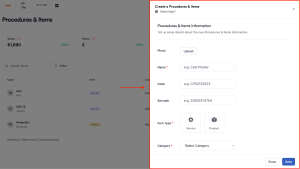
- All fields with a * mean they are required.
- Please fill in as much information as possible.
For items we want images and barcodes for better organization and imagery.
- The Category is a field that allows us to get a general sense for the type of service or item. An example of this is CPT codes 99204 and 99214 are both E/M visits, but one is for established Patient and the other is for a new Patient.
- For items you will want to add the current inventory that we have for it. Please note, as we add the items to the Patient encounter and/or bill, it will deduct the quantity to give us real time data.
- Place of service is extremely important to add for services like E/M visits, etc. Here is a list of all the Possible places of service. The most common ones we will use is 10, 11, and 20.
- Be sure to lookup the respective HCPCS or CPT code prior to inputting. This should be done by administrative or billing staff to make sure all information is properly inputted to receive reimbursements.
- Once created, these items will now be able to be applied to Patient encounters and be able to be submitted for billing.
Here is a video to help you better understand.
If you have any questions or would like more information, please reach out to support.
Comments (0)