
Who we send our Patients to is extremely important. It is our responsibility to make sure that we are not making the Patient suffer through the pitfalls of a referred provider. Because of this, we will be working with many specialists and they will be part of the team in various ways. This allows us to better control the Patient experience and get the Patient information in real time. Just as the suppliers, we grant limited access to the EHR and tell the referred providers that they must use our EHR. Because we are starting, this may not be the case for all referred providers, but we will be working diligently to make sure there is no specialist we send outside of the besa Health network.
📚Resources Needed
🚀 Tips & Tricks
-
Depending upon which specialty you select in the referral form will determine what referral provider is available.
- The provider will receive an email for each order that is sent, and will be able to get access to our system. They can see the Patient details for Patients that have been sent to them, they can message us and the Patient, and they can see all the information needed to better care for our Patients.
📘 Instructions
- Login to besa EHR using your credentials.
- Click on the image in the top right corner and select Settings.

- Go to the Referral Providers tab to see the referral list.

- From here, you can see all the different providers that we have and work with. Keep in mind that we do not just add referral providers. These are partners that we have come to agreements with on the level of care we expect when treating our Patients. We also expect real time updates and communication which is why they have a profile in our system.
- To create a new referral provider, click on the + New Referral button.

- The create supplier pop-up will appear through the slide in.
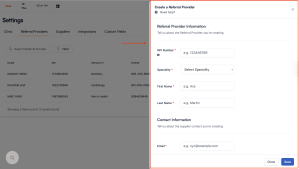
- All fields with the * are required and must be completed.
- Always double check to make sure the information is correct. The provider will be able to create their account and view the documents we send by completing a form which covers all the information in this create referral provider form.
Here is a video to help you better understand.
If you have any questions or would like more information, please reach out to support.
Comments (0)